There is a version of local AI that sounds incredibly simple: take a model, load it directly in the browser, and skip the cloud entirely. You get zero API keys, no usage limits, and no data leaving your device.
The reality is you are stacking six massive engineering problems on top of each other. Browsers are intentionally built to keep web pages from directly touching your hardware. Running an LLM locally means bypassing those protections to read gigabytes of disk space, hijack the GPU, run background threads, and share memory. You are navigating every constraint the browser has at exactly the same time. This post maps out the entire stack.
Part 1: Getting JavaScript to Talk to the GPU
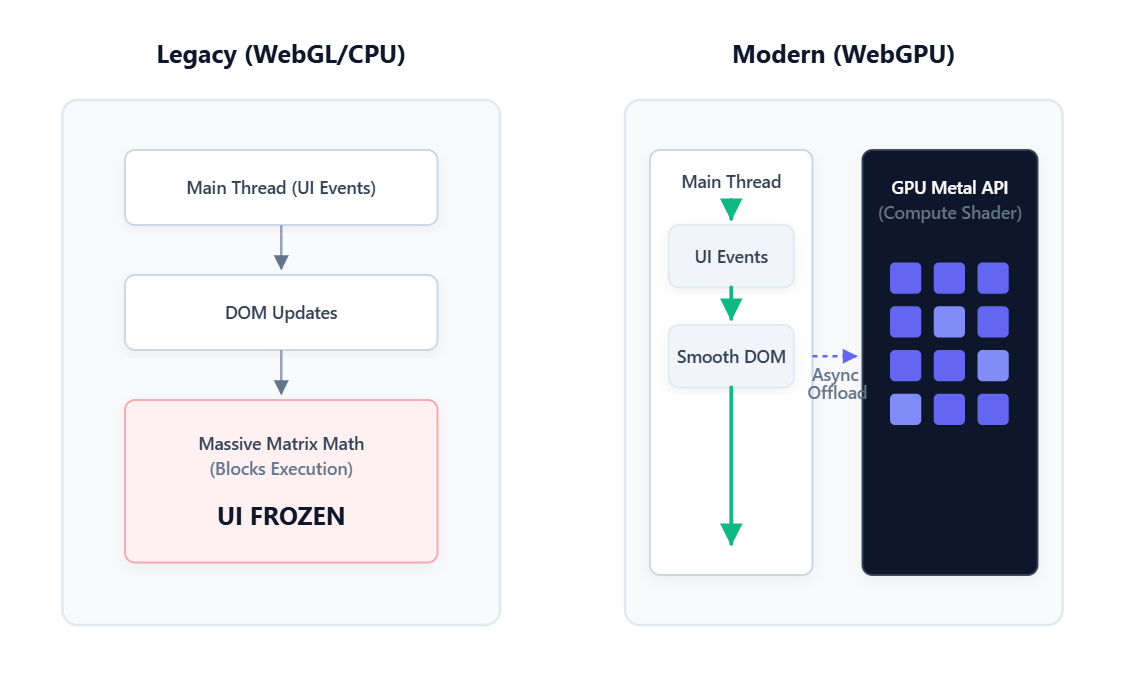
The Single Thread Problem Most people forget that JavaScript runs on one thread for everything. That same thread handles your button clicks, animations, network requests, and application logic.
When that thread is busy, everything else waits. If you try to run heavy matrix math directly on the main thread, the browser freezes. Scrolling stops, clicks do nothing, and the OS eventually asks if you want to force-kill the page. You need a completely different place to run the model.
The GPU Disguise Browsers have always been able to talk to the GPU, but historically only to draw graphics. Before we had better options, devs had to get creative. The trick was disguising math as images. Neural network weights were repackaged as fake pixel data and uploaded to the GPU as a texture. Results came back as more fake pixels and were decoded back into numbers. It worked, but it was like doing accounting with a paintbrush.
WebGPU Enters the Chat WebGPU shipped in Chrome and Edge in 2023 and changed everything. For the first time, browsers can talk to the GPU for pure computation. No graphics, no pixels, just math. You hand the GPU a block of numbers, run parallel operations across its cores, and get the results back. This is what makes browser AI real today.
Part 2: The Memory Problem
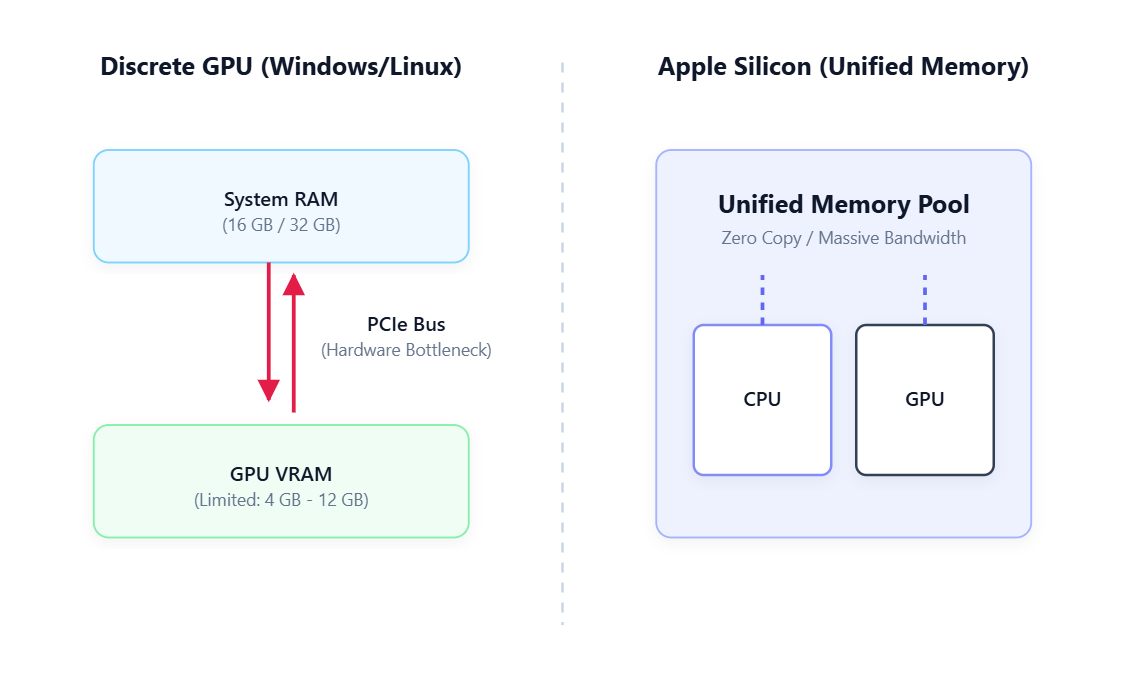
Your GPU Memory Is Not What You Think Once you reach the GPU, you hit the memory wall. GPU memory means completely different things depending on your machine:
- Discrete GPU (Windows/Linux): The GPU has its own separate memory pool called VRAM. Moving data from system RAM to VRAM requires crossing the PCIe bus. It is fast, but it creates a bottleneck and the pool is usually small.
- Apple Silicon: The CPU and GPU share one unified memory pool with no PCIe bus to cross. A MacBook with 16GB of RAM can hand all 16GB to the GPU. This massive memory bandwidth is exactly why Apple Silicon dominates local AI benchmarks.
- Integrated GPU (Intel/AMD): These share system RAM but usually have a tiny fixed pool limited to 1 or 2GB, making them mostly useless for browser inference.
The Hidden Browser Limit Even with great hardware, the browser enforces a hidden ceiling. A single tab cannot take 100% of your GPU memory. If it could, one bad site could crash your graphics driver. When an AI model asks for too much memory, the GPU context silently crashes. You can recover from it, but you cannot prevent it.
Quantization to the Rescue A 7 billion parameter model at full precision takes about 14GB of memory. That will instantly crash a browser tab. To survive, we use quantization. We compress the weights down from 16-bit to 4-bit integers. This shrinks the 14GB model down to roughly 4GB.
The catch is the GPU cannot do math on 4-bit numbers. At the exact millisecond of computation, each compressed weight is temporarily expanded back to 16-bit inside the GPU, used for math, and instantly discarded. It causes a tiny drop in quality, but for general Q&A, you will barely notice.
Part 3: Delivering a Gigabyte Payload
The First Visit Problem A compressed 1.8GB model is still a massive file. On an average mobile connection, downloading it takes over 10 minutes.
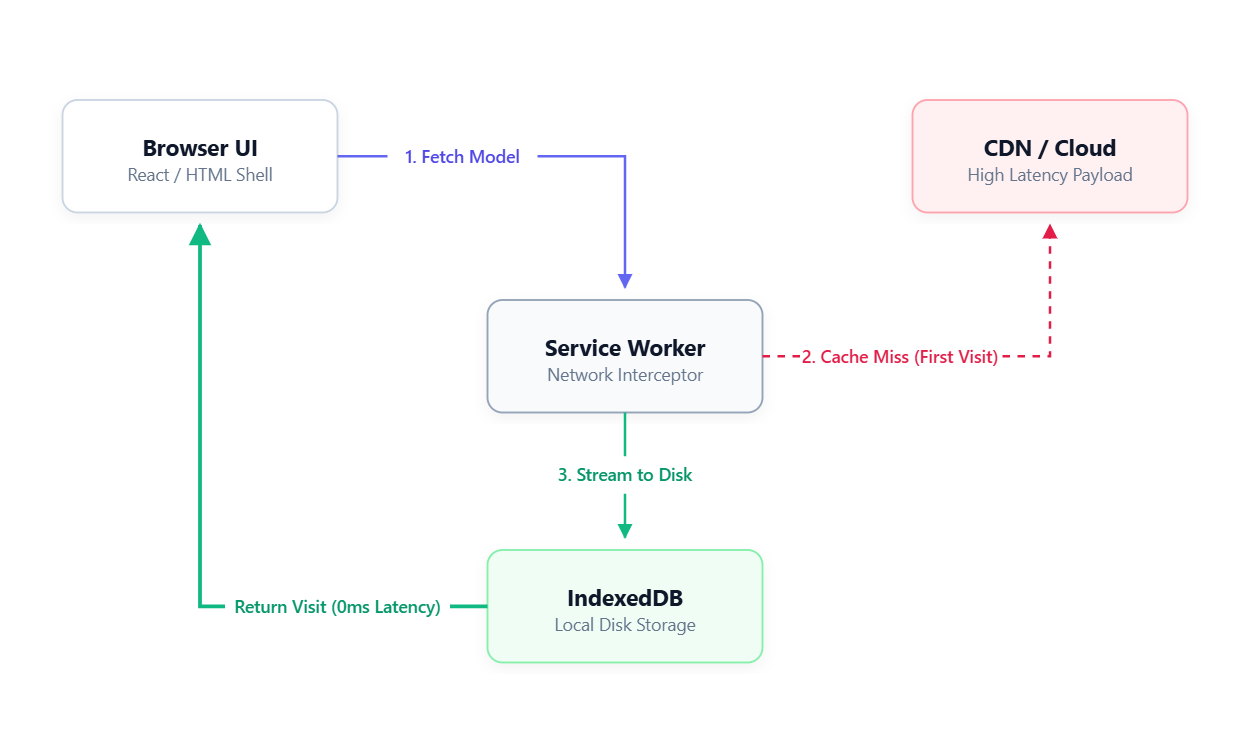
The architecture that solves this completely decouples the UI from the model. The web page loads instantly because it is just HTML and CSS. The massive model file downloads silently in the background.
Caching with Service Workers We use a Service Worker to act as a background network interceptor. On the first visit, it watches the model download and writes the chunks directly to the browser local storage (IndexedDB). On the next visit, the Service Worker intercepts the network request and serves the entire model directly from the local disk.
The Instant Load Myth Serving from cache is fast, but it is not instant. While the UI renders immediately, the GPU still has to wake up. It takes roughly 2 to 3 seconds for a cold GPU to recompile the compute shaders and load weights into memory before it spits out the very first token.
Part 4: Keeping the UI Alive
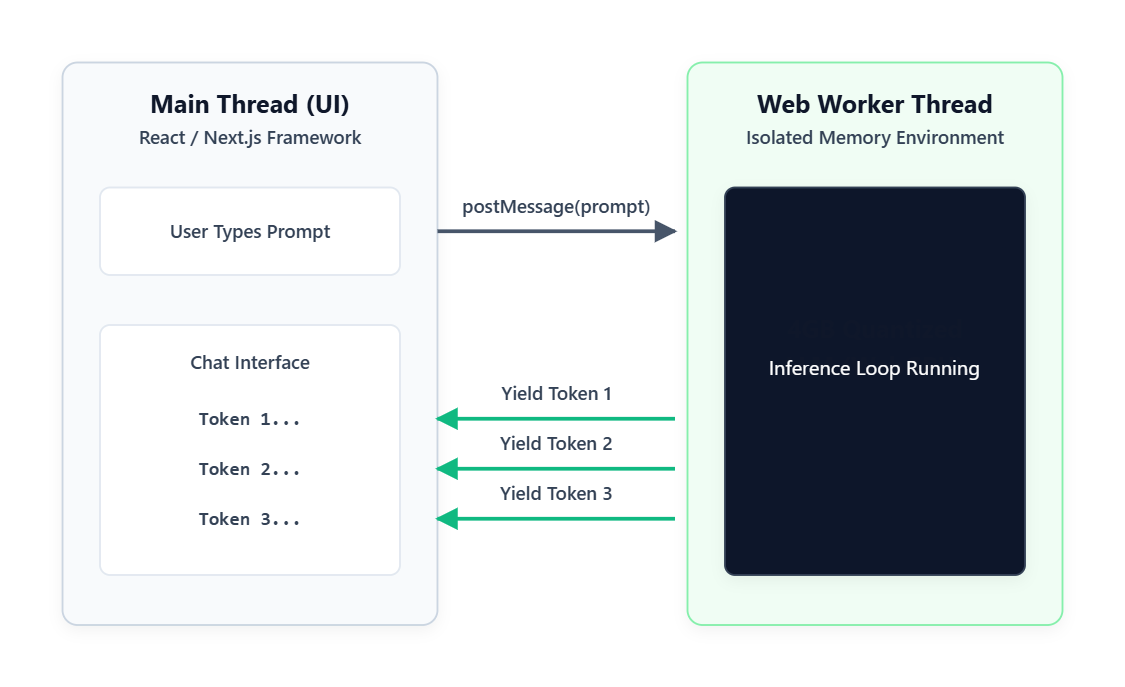
The Web Worker Solution To keep the visual interface smooth, the entire AI model runs inside a Web Worker. This is an isolated JavaScript thread that has no access to the page or the buttons. The main thread passes your prompt to the Worker, the Worker does the heavy math, and it streams the tokens back.
The Memory Sharing Issue
Getting data back and forth efficiently is tough. The standard method is message passing, which is fine for small conversational tokens. The absolute fastest method is SharedArrayBuffer, which lets both threads access the same block of memory with zero copying.
But SharedArrayBuffer was heavily restricted after the 2018 Spectre CPU vulnerability. To use it today, your server needs strict security headers that end up breaking common third-party scripts like analytics and payment widgets. Because of this, most production apps just accept the slight overhead of standard message passing.
Part 5: Why Memory Always Runs Out
Two Completely Different Speeds Testing inference speeds shows a massive gap. Prefill runs at over 160 tokens per second, while decode crawls at around 14 tokens per second.
This happens because the prefill phase reads your entire prompt at once in parallel. The decode phase generates the response sequentially. It cannot generate word four until it knows word three. You are feeling that slow, sequential execution every time you watch a model type.
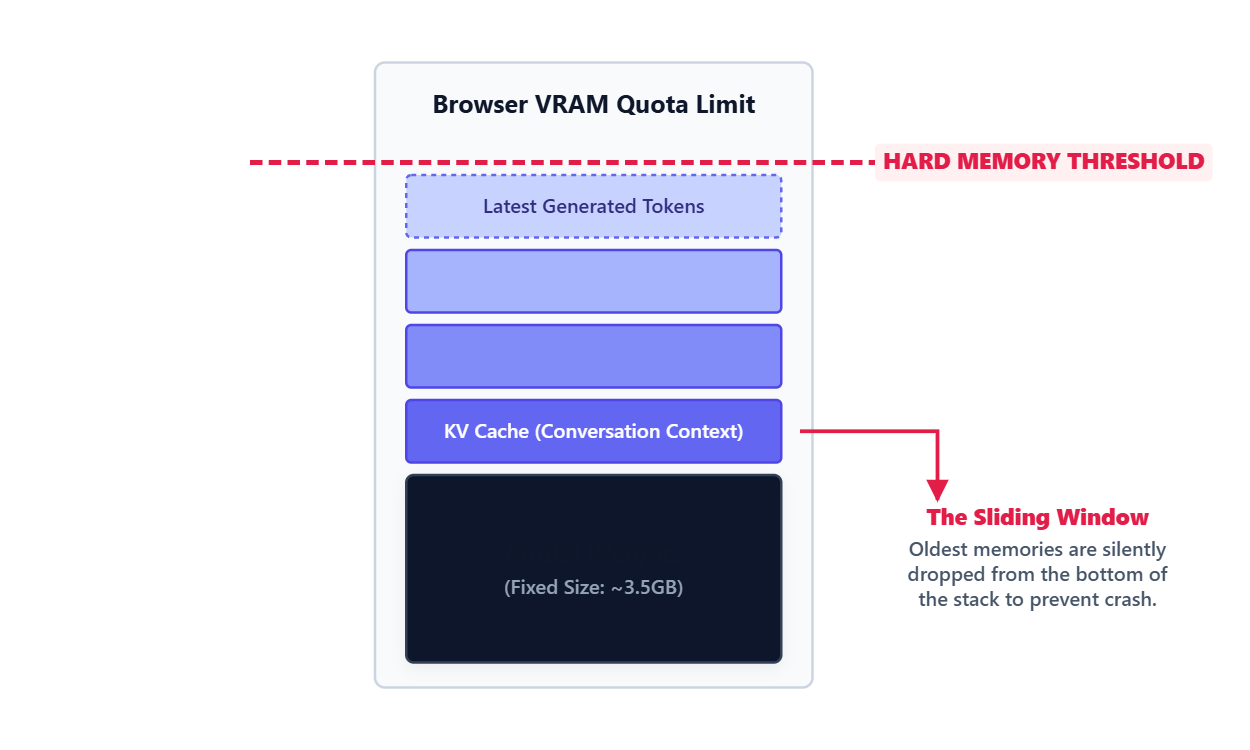
The KV Cache Leak To avoid recalculating the whole conversation on every single word, models store past context in the KV Cache. This cache grows linearly with the conversation. By the time you hit 32,000 tokens, the KV Cache alone consumes 3.6GB of memory, which is bigger than the actual model.
The Sliding Window Local browsers cannot handle 100,000 token contexts. When the KV Cache hits the browser memory limit, the model uses a sliding window strategy. It silently deletes the oldest messages from the beginning of the conversation to make room for new ones. There is no error state. The model just quietly forgets the start of the chat.
Part 6: The Semantic Router
The Honest Capability Gap A 3B local model is fundamentally different from a massive cloud supercomputer. It struggles with strict JSON formatting, multi-step logic, and long-range code generation. These are not bugs. They are the reality of running highly compressed weights on low-power hardware.
The Production Fix The real answer is not to force local models to do everything. You build a semantic router. Simple intents like text summarization route to the local WebGPU model for fast, free execution. Complex intents like SQL migrations get intercepted and sent to a paid cloud API.
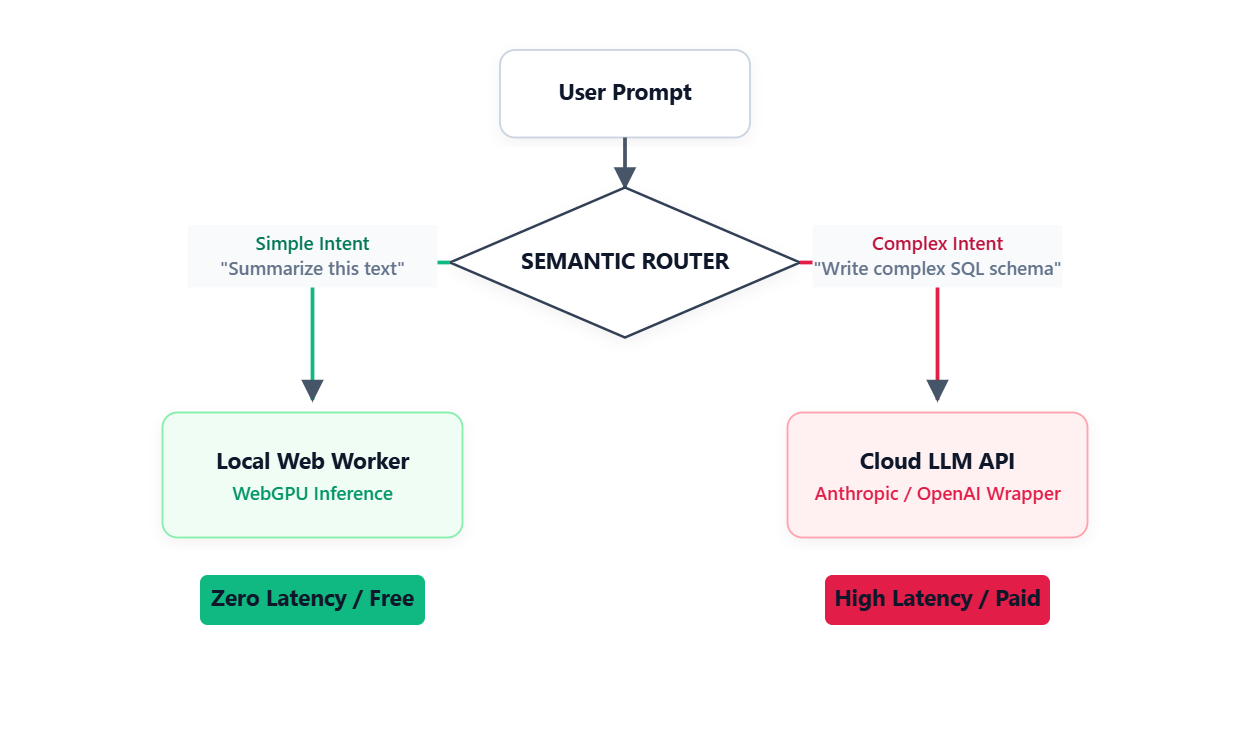
Research from LMSYS shows that this exact routing setup can cut your cloud API costs in half while keeping the response quality at 95%. From the user side, the experience is seamless. They just get the right answer at the best speed.